

Visual Reasoning takes artificial intelligence beyond simple visual recognition, enabling systems...

Multi-room audio systems are among the most effective solutions for enhancing the guest experienc...

Accsoon expands the CineView family with the Accsoon CineView Master 4K Lite, an affordable DCI 4...

Show lasers remain among the most engaging effects in visual entertainment. Audio Effetti has alr...
MIR 2026 in Rimini has just come to a close, once again confirming its role as a key reference po...

Audio Effetti is proud to announce a new partnership for the exclusive distribution in Italy of G...

Audio Effetti is pleased to announce – and, if we may, with a touch of pride – the addition of a...

Motorized moving head fixtures incorporate some of the most advanced technologies in professional...

The mixer is one of the key components of any audio system: it collects signals from microphones,...

Audio Effetti expands its catalog with Rolux, a company founded in 2012 and specialized in the de...

After examining flame and smoke machines over the past months, it is now time to take a closer lo...

Last February, the service provider Niutek was responsible for the supply and technical video ins...

Selecting a lighting controller that truly meets operational requirements can prove more complex...

A PA system comprising a pair of Harmonic Design clusters with just three HLS24P per side, comple...
On the occasion of Audio Effetti’s 25th anniversary, we are launching a series of interviews dedi...

In professional video installations, the demand for reliable floor-mounted LED wall solutions con...

Audio Effetti introduces a major new firmware update for the Accsoon CineView M7 and M7 Pro smart...

From choosing the optimal location to preparing the wall and supporting structure, from cabling t...

MADRIX is widely recognised as the most advanced lighting control software on the market, thanks...

Ceiling speakers are among the most widely used loudspeaker types for permanent installations. Th...

Snow effect machines are designed to recreate a winter atmosphere by producing artificial snow. U...

The service company Pro-One from Sesto Calende (VA) created a concave, U-shaped LED wall for the...

The C, PL and HLS series loudspeakers from Harmonic Design share many common features, despite be...

PTZ cameras have long represented a versatile and powerful solution for anyone needing dynamic ca...

For the 34th edition of the SilverSkiff Trophy, the international rowing regatta on the River Po...

Video projectors and LED walls are now widely adopted across events, visual communication and pro...

Audio Effetti announces the exclusive distribution in Italy of SGM Lighting’s entertainment produ...

Talking about SMPTE 2110 means addressing a very current topic that is transforming the broadcast...

Fluids are an essential element for the correct operation of atmospheric effects devices, even th...

In the professional audio landscape, wireless microphones are widely used in events, live perform...

A DMX console is the nerve center of any professional lighting system. Whether it’s a small live...

For the new Sartoriani showroom inside the WALTHERPARK shopping center in Bolzano, our client Olf...

Audio over IP has, for several years now, been an essential standard for professional installatio...

In the magnificent setting of Palazzo Te in Mantua, the 2025/2026 Serie BKT fixture list was offi...

From artificial intelligence to integrated solutions, professional and educational environments a...

On August 1st, the scenic Piazza Grande in Palmanova (UD), the Friulian city famous for its star-...
![AE-202510-Effetti speciali in teatro[2].jpg](/news/177205/image-thumb__177205__blog-list-image/AE-202510-Effetti%20speciali%20in%20teatro%5B2%5D@2x.fec93fba.jpg "The magic of special effects in theatre")
Behind every theatre scene lies a world of creativity, technique, and passion. In this article, w...

At the 19th edition of the Mirano Summer Festival, one of the most anticipated music events in No...

Load cells are essential devices for monitoring the stability of truss structures used in any typ...

In a world that is constantly evolving, where visual experience and logistical efficiency are inc...

Optical fiber has played a key role in our industry for years. Operational reliability, performan...

At a prestigious medical conference promoted by Novartis, held at the Salone delle Fontane in Rom...

Beamforming refers to a “beam-shaping” technique based on digital signal processing that allows p...

Battery-powered fixtures offer a versatile solution for professional lighting and beyond, especia...

During Gigi D’Agostino’s live set at Collisioni Festival 2025 in Alba, the stage production reach...

Audio Effetti offers a curated range of installation LED walls from brands such as EGO Display an...

The urban redevelopment project of Viale Ceccarini is transforming one of Riccione’s most iconic...

Architectural lighting is a true “visual language,” capable of transforming urban spaces and enha...

Professional fog machines are widely used to create artificial fog or smoke for visual and scenic...

To ensure effective visual communication and an immersive experience during the “Just The Woman I...

Lighting a theatre stage involves far more than simply illuminating actors and sets—it means crea...

The 105 Summer Festival is one of the most popular music events of the year, organized by Radio 1...

Alongside loudspeakers, power amplifiers form the core of any PA system: they drive the speakers...

Once again, the natural setting of Annone di Brianza, in the province of Lecco, provided the back...

A Harmonic Design audio system acoustically enhanced Piazza Santa Maria Maggiore, ensuring flawle...

Essential to making an event professional, dynamic, and engaging, the graphics control system is...

A major concert, one of the most important music productions of the year, and an opportunity for...

In the world of professional lighting and displays, three technologies have become widely establi...

In the central square of the Poseidon Shopping Center in Carini, near Palermo Airport, our client...

Audio Effetti is proud to announce the addition of a new brand to its distribution portfolio: OZE...

Truss structures, commonly referred to as “trusses” or “American-style trusses”, are a key elemen...

When we think of LED lighting, energy efficiency and durability are often the first things that c...

On May 26th, 2025, Teatro Regio in Turin hosted the TEDx Torino event dedicated to the theme Clos...

Wireless video transmitters and receivers have revolutionized audiovisual production. Thanks to a...

At the Horizon Music Festival, held on May 16–17 on Lake Garda, our client SpecialFX Pro deployed...

Show lasers are among the most powerful and captivating tools in visual entertainment. Their brig...

Starting from June 2025, Audio Effetti becomes the official distributor for Italy of Swiff Audio—...

At Naples Capodichino International Airport, an indoor LED wall has been installed by our client...

Your Music is a historic music store in Rome, founded in the mid-1980s with an initial focus on g...

As summer approaches, the squares of Italy’s major cities are transformed into open-air stages, r...

Our client EmmeTech, based in Darfo Boario Terme (BS), successfully created the lighting setup fo...

The 2025 edition of the NAB Show in Las Vegas has just wrapped up, and the Audio Effetti team had...

CO2 special effects machines use carbon dioxide stored in pressurized cylinders to create thick,...

The team behind Radio 105 selected the Yes Tech P3.9 MG7S LED wall for all nineteen dates of the...

Audio Effetti presents the new Briteq BTI-BLIZZARD BSW2 hybrid moving head luminaire, which is IP...

Audio Effetti is proud to announce the latest addition to Avolites' renowned Diamond series...

Audio Effetti is pleased to announce that NDI licensing will soon be included with all purchases...

The Magic Stage series is the most powerful tool from Yes Tech, the world’s leading LED display m...

Audio Effetti presents a new Evolite moving head washlight for lighting and entertainment profess...

On the 2nd of December last year, the second edition of Christmas World was held in Rome. During...
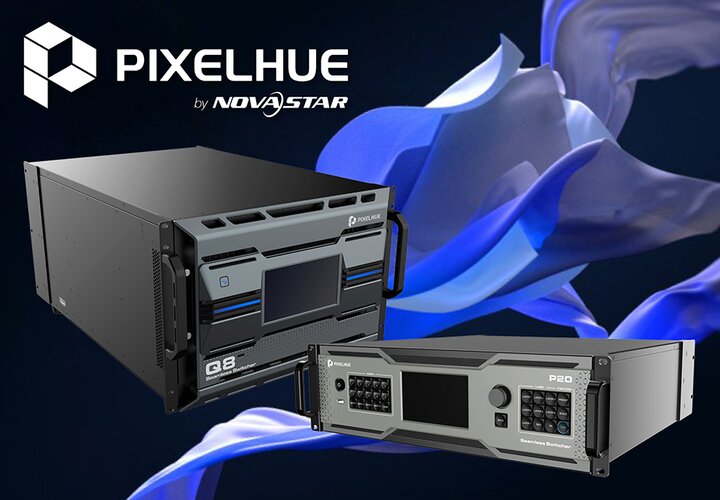
After last November’s “minor” update, Pixelhue announces new firmware upgrades for the P10, P20 a...

Three different types of Yes Tech LED display modules helped to create a unique visual effect dur...

Audio Effetti presents a major innovation from NovaStar, the first product in the Taurus Ultra se...

Blackmagic Design today announced Blackmagic Video Assist 3.3 update which adds webcam support fr...

Il nuovo modello con motore di registrazione a cinque canali genera file video per montare l’even...

Converte il flusso di streaming H.264 di ATEM Mini Pro per inviarlo agli studi di trasmissione in...
New converter decodes H.264 live stream from ATEM Mini Pro so you can connect direct to any broad...
New model adds a 5 channel recording engine to write all video inputs as separate video files for...

Blackmagic Design announced UltraStudio Monitor 3G and UltraStudio Recorder 3G, two new capture a...

New affordable models of Blackmagic Video Assist add large screen monitoring, better recording co...

The world’s most advanced digital film camera with new Super 35 12K image sensor, new Generation...

2 massive new control panels for all ATEM switchers feature a combination of innovative design an...

More affordable price and recent studio camera software makes it even easier to set up high quali...

Advanced 8K monitoring solution that lets you use the new Apple Pro Display XDR as a color critic...

Powerful new model adds a new hardware streaming engine via Ethernet, recording to USB flash disk...

Blackmagic Camera 6.9 update adds studio camera features such as remote control, tally and DaVinc...

New and free software update adds new H.264 codec, new AAC audio codec, longer single file record...

The MicroNet Slim interface, a network laser interface specifically sold in combination with Phoe...

The RTI PIKO RGB 28 has been released by Ray Technologies GmbH as the flagship product with the l...

The new EL-300RGB from Laserworld is the perfect effects laser for the use in small to medium siz...

Blackmagic Design announced that TUNEDiD studio, a motion capture studio based in Tokyo and owned...

Blackmagic Design announced that award winning live director, Steve Price, used the Blackmagic Po...

Le Maitre will be exhibiting at LDI on November 22-24 at the Las Vegas Convention Center. They wi...

Blackmagic Design announced that Los Angeles based production company Genius Produced utilizes a...

Blackmagic Design announced that Astro Design, a Japanese manufacturer specializing in 8K product...

Blackmagic Design today announced that Teleclub, Switzerland’s leading Pay TV network, has implem...

Blackmagic Design announced that its ATEM Constellation 8K live production switcher was used as p...

Blackmagic Design announced that Chilean production company, AGTV, incorporated a full Blackmagic...

New laser technology from Pangolin - CITP, sACN, and the highly anticipated FB4 Content Pack!

New affordable live production switcher specifically designed for YouTube live streaming and busi...

New Video Assist models add large screen HDR monitoring to any camera, as well as better recordin...

New software update adds Blackmagic RAW to URSA Broadcast cameras plus a whole new image processi...

New generation of hardware control panel for all Blackmagic Design Videohub routers, featuring an...

New stylishly designed model of cut-bus style router control panel for all Blackmagic Design Vide...

Blackmagic Design announced that a multicamera live production workflow, featuring the URSA Broad...

Blackmagic Design announced that GlobeStream Media live streamed USA Softball’s GOLD National Cha...

Blackmagic Design announced that a number of the 2019 summer season’s worldwide film releases use...

Blackmagic Design announced that critically acclaimed television concert series “Front and Center...

Next generation digital film camera enables filmmakers to access the amazing quality of 6K digita...

New DaVinci Resolve 16.1 Public Beta includes new features to dramatically decrease the turn arou...

New UltraStudio 4K Mini allows any Thunderbolt 3 computer to connect to any video device and is t...

Blackmagic Design announced that Dutch hardstyle dance festival Defqon.1 relied on a live product...

As of 5th August 2019, Litec Italia S.r.l. and Audio Effetti S.r.l will integrate and combine the...

Blackmagic Design announced that Canada based Echo Bay Media used two Blackmagic Pocket Cinema Ca...

A new generation of laser devices has recently been released by the Laserworld Group: With the in...

Blackmagic Design announced that its URSA Mini Pro 4.6K digital film cameras and ATEM 4 M/E Broad...

Blackmagic Design announced that Matthew Rosen’s film “Quezon’s Game” was shot using Blackmagic D...

Blackmagic Design today announced that the newest branch of South Africa’s Christian Revival Chur...

Blackmagic Design announced director and videographer Ben Hausdorff used the Blackmagic Pocket Ci...

Blackmagic Design announced that Hyper Rabbit Power Go (Hyper RPG), an online gathering place cen...

The CS-2000RGB just got an upgrade! The Laserworld CS-2000RGB FX replaces our popular Laserworld...

Laser control becomes much easier now: The Laserworld Group integrates the ShowNET interface as m...

Blackmagic Design announced that the hit Tony winning Broadway play “Network” used its products t...

Blackmagic Design announced that Apex Broadcast has built a custom OB truck packed with the ATEM...

Blackmagic Design announced that “So Long,” Diplo’s latest music video featuring country artist C...

Blackmagic Design announced that South Korea based independent record label Areia Creations shot...

Blackmagic Design announced that the ASTROLab, an astronomy activity center located at the Mont-M...

Blackmagic Design announced that a multicam outside broadcast workflow, featuring URSA Broadcast...

Blackmagic Design announced that Showtime Networks’ “The Chi” incorporated a wide array of Blackm...

Blackmagic Design announced Teranex Mini SDI to DisplayPort 8K HDR, an advanced 8K DisplayPort mo...

Blackmagic Design has announced that its Blackmagic Micro Cinema Camera was used in the filming o...

Blackmagic Design has announced that “Zero,” a new science fiction short from acclaimed British w...

Blackmagic Design announced that Seattle based Punch Drunk Productions used a full Blackmagic Des...

Blackmagic Design announced that the Western Fire Chiefs Association used the Blackmagic Design U...

Go behind the scenes of Paris Fashion Week, to see how fashion show specialists, Freecaster, capt...

Blackmagic Design announced that CATV TOKUSHIMA, Inc. replaced their 2K live broadcast system wit...

The world's first 8K broadcast deck with advanced H.265 recording, touch screen interface, intern...

Blackmagic Design announced Teranex Mini SDI to HDMI 8K HDR, a new advanced 8K HDMI monitoring so...

Powerful 8K switcher with 8K DVE, standards converted 8K inputs, 8K SuperSource, 8K chroma key an...

Super fast rack mount 4 slot USB-C disk dock lets you edit directly from your media disks!

Laserworld are presenting their Showcontroller software here at Prolight + Sound 2010, a laser sh...

Blackmagic Design announced that the YouTube series "Flunk," which also airs on Amazon Prime and...

Blackmagic Design announced that China’s Anhui TV designed its first 4K OB van with Blackmagic De...

Blackmagic Design announced that it has won three gold award wins at this year’s prestigious iF D...

Pangolin has been working with industry leading laserists and lighting designers, to create a cus...

Our new and expanded FB4 profile will be one of the centerpieces of our booth at Prolight+Sound.

KINETIC lights have been extremely popular in recent times, especially when you combine them with...

Blackmagic Design announced that broadcast services specialist, Timeline TV, has implemented a be...

Blackmagic Design announced that YouTube channel Hashtag United is using the URSA Mini Pro 4.6K a...

Next generation URSA Mini Pro camera features new electronics, Super 35 4.6K HDR image sensor, 15...

Blackmagic Design announced Blackmagic Camera 6.2 update which adds support for Blackmagic RAW to...

Blackmagic Design announced that German Bundesliga football club, TSG 1899 Hoffenheim, has overha...

Blackmagic Design announced that Grupo La República, a leading media organization in Lima, Perú,...

Blackmagic Design would like to congratulate the 2019 Oscar nominated films and the production pr...

Blackmagic Design announced that acclaimed cinematographer Roy H. Wagner, ASC shot the upcoming m...

Blackmagic Design announced that Swansea City Association Football Club (AFC) has developed its o...

Blackmagic Design announced that Dubai based satellite channel, Citruss World of Shopping, has im...

Blackmagic Design announced that it has formed a strategic partnership with the USC School of Cin...

Laserworld announces start of the distribution of LaserAnimation Sollinger PHAENON accurate laser...

Today, Resolume released Resolume 6.1.2 into the wild. It wasn't easy. There were tears. There wa...

Laserworld released “Showcontroller”, a new laser show control software that was especially desig...

Blackmagic Design announced that Quicklink, one of the leading global providers of software and...

Le Maitre's MVS Hazer was currently used in the Cambridge University European Theatre Group's ada...

Blackmagic Design announced its products were used for the live production of SOFT DARTS PROFESSI...

Development of the new CO2 Wave Jet is now finished, and this new effect device is ready for the...

Blackmagic Design announced that the company’s production and post products are being used to com...

Blackmagic Design announced that Orbital Redux, a live performed eight episode scripted science f...

Blackmagic Design announced that DP Eric Koretz used a Micro Studio Camera 4K and Video Assist 4...

Blackmagic Design announced that Red Bull Japan is using ATEM Production Studio 4K live productio...

Blackmagic Design announced that Austin, Texas based full service production studio Zodiac Studio...

Le Maitre's GForce 1 and GForce 3 smoke generators have been used by Scottish Fire and Rescue Ser...

Le Maitre's Arctic Snow Machine can help transform your event, production, film or photo shoot in...

Blackmagic Design announced that its ATEM 4 M/E Broadcast Studio 4K live production switcher and...

Blackmagic Design announced that the live production workflow for Grammy nominated American rock...

With the PL-5500RGB Outdoor, Laserworld released a professional laser system specifically dedicat...

Blackmagic Design announced that New York City based production company Live X used a full Blackm...

The new FLEX RS1 from RGBlink is a unique 4K video processing solution - not only a flexible hard...

The development of the new Power Flame has come to a successful conclusion. After finishing the f...

Blackmagic Design announced that USA Network’s “Queen of the South” used Blackmagic Design Micro...

Blackmagic Design announced that Red Bull’s Gaming Sphere in London has been built on a live prod...

Blackmagic Design announced that the online series “More Than Just Parks” is captured with an URS...

The Sony VPL-PHZ10 was declared winner in the extremely competitive ‚ÄòProjector of the Year’ (7,...

Blackmagic Design announced that MEPTIK, in association with Defacto Entertainment, is using Deck...

Blackmagic Design announced that Japan’s CyberZ built a new eSports studio in its media departmen...

Blackmagic Design announced that its URSA Broadcast with ATEM Camera Control Panel has been used...

Nebula, the popular LED pixel tape driver from Madrix, has received two major new upgrades.

ImageCue has made available a new suite of free content preparation utilities for its users.
Are you a reseller of professional audio, video and lighting products and interested in knowing the price reserved for you?
Follow the link and register on audioeffetti.com. You will have access to the broadest catalogue of high quality products from the most prestigious international brands.
Register

 English
  French


